LingQ | Learn Languages
LingQ Languages Ltd.Education
4.51.84K Reviews
- Version
- 6.1.24
- Installs
- 1.00M
- Age Rating
- Everyone
Screenshots




Our Review of LingQ | Learn Languages
 Analysis by Appyee
I tend to judge a language app by what happens after the first burst of enthusiasm: does it still fit into an ordinary day, and can I keep using it when I’m tired or short on time? LingQ - Language Learning is most appealing when I want to spend time with the language itself rather than move through a fixed sequence of drills. It is an education app from LingQ Languages Ltd., built around reading and listening to material that gives words a real context. That approach can feel more natural than translating isolated phrases, though it also asks me to take an active role in choosing what to study.
What a short session can realistically accomplish
LingQ suits learning in small, repeatable blocks. I can open a lesson, read or listen for a while, and save unfamiliar vocabulary instead of needing to finish a long unit before the session feels useful. That matters on a busy day: a few focused minutes with a short piece of content can be easier to fit in than a full classroom-style lesson. The trade-off is that the app’s value depends on returning to the material and words I have collected; simply opening it does not make practice automatic.
The store shows an average rating of 4.6 from around 49,000 ratings, and more than a million installs. Those figures suggest that the format has found an audience, but they do not tell me whether it suits a particular learner. I would treat them as background, then ask a more practical question: do I enjoy learning through content enough to make it part of my routine?
Where it sits beside familiar language apps
Compared with a typical lesson-first language app, LingQ puts more weight on encountering words in connected reading and listening. That can be a better fit if I already know some basics and want to build comprehension without spending every session on scripted prompts. A structured course may be easier for someone who wants a clear order, frequent small exercises, and a strong sense of what comes next. LingQ gives me more room to follow curiosity, but that freedom can also make it harder to decide what to do when I have no topic in mind.
I would not choose it as my only tool if my immediate priority were rehearsing a specific conversation for a trip or getting corrections on spoken pronunciation. Its strongest appeal is repeated exposure to useful language in context. For speaking confidence, I would pair that kind of input with actual conversation practice rather than expect reading and listening alone to do the whole job.
Getting Started with LingQ
I remember when I first opened LingQ, I was pleasantly surprised by its clean and user-friendly interface. It’s like having a personal language tutor in your pocket! The app welcomes you with a simple setup process where you can select from a wide range of languages. From Spanish to Russian, it’s got you covered.
Once you’ve picked your language, the app creates a personalized learning path tailored to your level. What I love here is the flexibility – whether you’re a complete newbie or brushing up on skills, LingQ adapts to your needs. You’re never stuck in one place, which is key for keeping motivation high.
The Unique Learning Approach
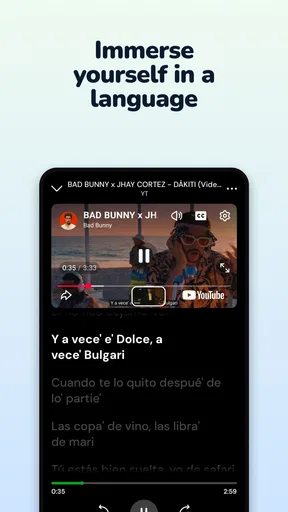
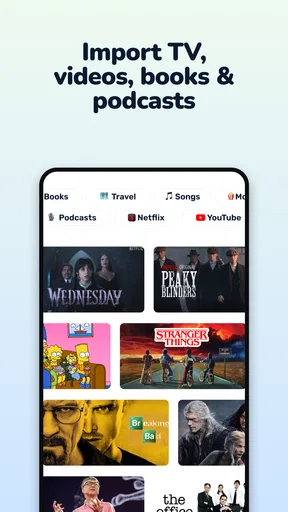
One of the standout features is its immersive reading experience. LingQ introduces you to real-world content like news articles, podcasts, and even popular YouTube videos. It’s a refreshing change from the usual textbook dialogues, and it helps to see how the language is used in everyday contexts.
As you read or listen, you can click on words or phrases to see their meanings and save them to your personal vocabulary list, or as they call it, your "LingQs". It’s a simple yet powerful tool that helps reinforce learning. I found myself constantly adding new words, and the spaced repetition system ensures they stick in my long-term memory.
Interactive Community and Support
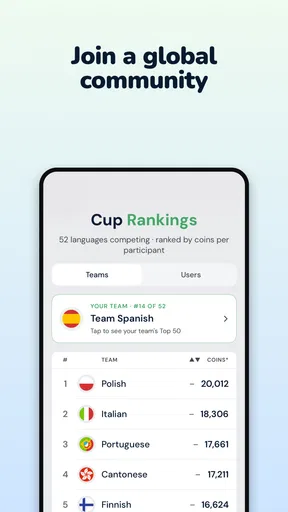
What’s a learning journey without a little social interaction, right? LingQ’s community aspect is fantastic. You can join forums, participate in group discussions, or even find a language exchange partner. It’s like having a built-in support system, and it’s reassuring to know you’re not alone in your language journey.
Plus, if you ever hit a snag, the support team is responsive and always ready to help. They’ve got this knack for making you feel valued as a learner, and that’s a big plus in my book.
Customization and Flexibility
LingQ lets you tailor your learning experience to suit your style. You can adjust the difficulty of the content and choose topics that interest you. This level of customization keeps learning fresh and exciting. I often found myself diving into articles about culture and travel, which made the learning process all the more enjoyable.
Another neat feature is the ability to import your own content. Whether it’s your favorite blog or an interesting article you stumbled upon, you can bring it into the app and learn from it. It’s a great way to make learning personal and relevant.
Making imported material work harder
Importing something I genuinely want to read is more than a novelty: it can solve the familiar problem of losing interest in lessons whose subject matter feels distant. I might choose a short article related to a hobby, then use it as a focused study session rather than importing a long stream of material I will never revisit. A useful habit is to stop after a manageable passage, save only words that seem likely to matter again, and return to them later. Saving every unfamiliar term can make the vocabulary list feel impressive while making review feel like a chore.
That choice also helps with difficulty. If nearly every sentence requires stopping for help, the content is probably too demanding for a relaxed session. If almost nothing is new, it may be better to move to a richer text or listen to material at a more natural pace. I find the best middle ground is content that remains understandable overall but still gives me a few worthwhile words and expressions to notice.
A routine that survives a busy week
A realistic use case is a commuter who has a little time before work but not enough energy for a full lesson. I could read one short piece over breakfast, mark a few expressions, and revisit the same subject during a quieter moment later. On another day, I might listen instead of reading, so the habit does not depend on always having my eyes free. The key is to make the task small and specific: finish a passage, review a short group of saved words, or listen for the general meaning. That is more sustainable than promising myself an ambitious study session every day.
This approach is especially useful for learners who enjoy following personal interests. Someone studying Spanish for travel, for example, may stay more engaged with culture or destination-related material than with unrelated sample dialogues. But if the goal is to memorize a set of phrases for an imminent appointment, a phrasebook or a tightly organized beginner course may get to the point faster. LingQ’s flexibility is a strength when curiosity can guide the session and a weakness when I need someone else to set every step.
Choosing a sensible level of commitment
The app is free to download, with in-app purchases ranging from about fifteen dollars to around two hundred seventy dollars per item. I would start by checking whether its content-led style suits me before paying for anything. That is a more useful test than judging the app by how many tools it appears to offer: do I actually read or listen regularly, and do I return to saved vocabulary? The answer should guide whether a paid option makes sense for my own use, rather than assuming that spending more will fix a routine that has not formed.
LingQ is rated for everyone, and its current version is 6.0.24. It is available for devices running operating system version 10 or later, so I would check that requirement before trying to install it on an older phone or tablet. The app began its release history on October 7, 2011, and its long-running presence may reassure people looking for an established learning tool, but device compatibility still matters more than age or popularity when deciding whether it will work on a particular handset.
Speed, heavier sessions, and recovery
For ordinary study, the workflow is straightforward: choose material, read or listen, and interact with words that deserve attention. I would expect the experience to feel most fluid when I keep a session focused on one piece of content instead of constantly switching among topics. A heavier session—reading a longer item, checking many expressions, and building a substantial vocabulary list—naturally involves more interruptions than simply listening through a familiar passage. That is not necessarily a performance problem; it is part of the close-reading method, and it can make a session feel slower than a rapid-fire quiz app.
I also think it is sensible to separate app reliability from learning consistency. No language tool can guarantee that I will remember every word after one encounter, and a disrupted routine can make progress feel uneven. When I return after a gap, the practical recovery move is to pick an accessible piece of content and restart with a modest goal, rather than trying to compensate by collecting a large backlog of vocabulary at once. That keeps the work approachable and makes it easier to notice what I still recognize.
Who should choose another approach
LingQ is a stronger match for people who are comfortable learning from context, like reading or listening, and want control over the subjects they encounter. It may also suit someone who has studied a language before and now needs more exposure than another explanation of basic grammar. By contrast, a learner who wants a strict daily checklist, immediate correction on every answer, or a course that carefully introduces each concept in a fixed order may be happier with a more guided alternative. Neither style is universally better; the important difference is how much planning and initiative the learner wants to supply.
I would also keep expectations grounded about what content-based practice can do. Recognizing a word while reading is not the same as retrieving it in conversation, and understanding a podcast does not automatically make speaking effortless. LingQ can give me useful contact with vocabulary and phrasing, but I still need opportunities to produce the language if that is one of my goals. Treating comprehension and conversation as related but separate skills leads to a more realistic plan than expecting one app to cover every need.
Final Thoughts
Wrapping up, LingQ - Language Learning is a robust and dynamic tool for anyone serious about picking up a new language. Its blend of real-world content, interactive community, and flexible learning paths makes it stand out from the crowd. Whether you’re on your daily commute or lounging at home, this app turns any moment into a learning opportunity.
So, if you’re ready to step up your language game, give LingQ a try. It’s a journey worth taking, and who knows? You might just find yourself speaking like a local sooner than you think!
Verdict
Strengths of LingQ | Learn Languages
- Wide range of languages available.
- Customizable learning experience.
- Offline mode for learning anywhere.
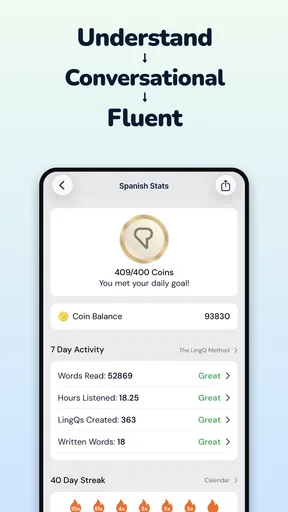
- Tracks progress effectively.
- Interactive and engaging content.
Limitations of LingQ | Learn Languages
- Premium features require subscription.
- Interface can be overwhelming.
- Limited free content access.
- Occasional app glitches reported.
- Community features need improvement.
Similar Picks in This Category
View All
Duolingo: Language Lessons
Duolingo4.7

Google Classroom
Google LLC2.8

Unacademy: Learn & Crack Exams
Unacademy3.2

Bible App for Kids
Life.Church4.4

Cake - Learn English & Korean
Cake Corp.4.7

Brainly: AI Homework Helper
Brainly4.5
Frequently Asked Questions
What languages can I learn with LingQ?
LingQ offers a wide variety of languages to learn, including popular ones like Spanish, French, and German, as well as less common languages like Ukrainian, Persian, and Esperanto. It supports over 25 languages, catering to both beginners and advanced learners. Always check for updates, as they frequently add new languages and resources.
Is LingQ suitable for beginners?
Yes, LingQ is suitable for beginners as well as intermediate and advanced learners. The app provides content that ranges in difficulty, so beginners can start with simpler lessons and gradually progress to more complex material. The interactive flashcards and vocabulary-building tools are especially useful for new learners.
How does LingQ’s learning method work?
LingQ uses an immersive approach by exposing learners to authentic content. Users read and listen to real-world texts and audio, creating 'LingQs'—words and phrases they want to learn. The system then tracks progress and reinforces learning through spaced repetition, enhancing retention and comprehension over time.
Can I use LingQ offline?
Yes, LingQ offers offline functionality. Users can download lessons to their devices and continue learning without an active internet connection. This feature is particularly useful for learners who travel frequently or have limited access to the internet, ensuring uninterrupted study sessions.
Is there a free version of LingQ available?
LingQ offers a free version with limited features, allowing users to explore the app’s capabilities. However, to unlock the full potential of the app, including unlimited LingQs and advanced lesson options, a subscription is required. The premium version provides a richer and more comprehensive learning experience.
